Checklists & Templates
Reusable checklists and templates from SavvySkull guides, each available as a versioned CSV download with no email required.
These are the reusable tables from SavvySkull guides, collected in one place. Each template opens inside its guide, where the method behind it is explained, so you can see why each field is there before you fill it in.
Every template can also be downloaded as a CSV file. The CSV opens in any spreadsheet application. You do not need to give an email address or sign up for anything to download one.
What the templates are and how they relate to the guides
A guide explains a method, and a template is the table that records the result of applying it. The power station sizing worksheet, for instance, belongs to the power station sizing guide, which explains why each load needs a power figure and an operating time before a capacity can be estimated. Filling in the worksheet without that explanation is possible, but the guide tells you which numbers to trust, which to check against a manual and which to treat as assumptions.
The templates are starting points. They do not replace the manual for your equipment, the requirements of your site, or advice from a qualified professional. Examples inside them are illustrative and state their assumptions.
A suggested sequence for a purchase project
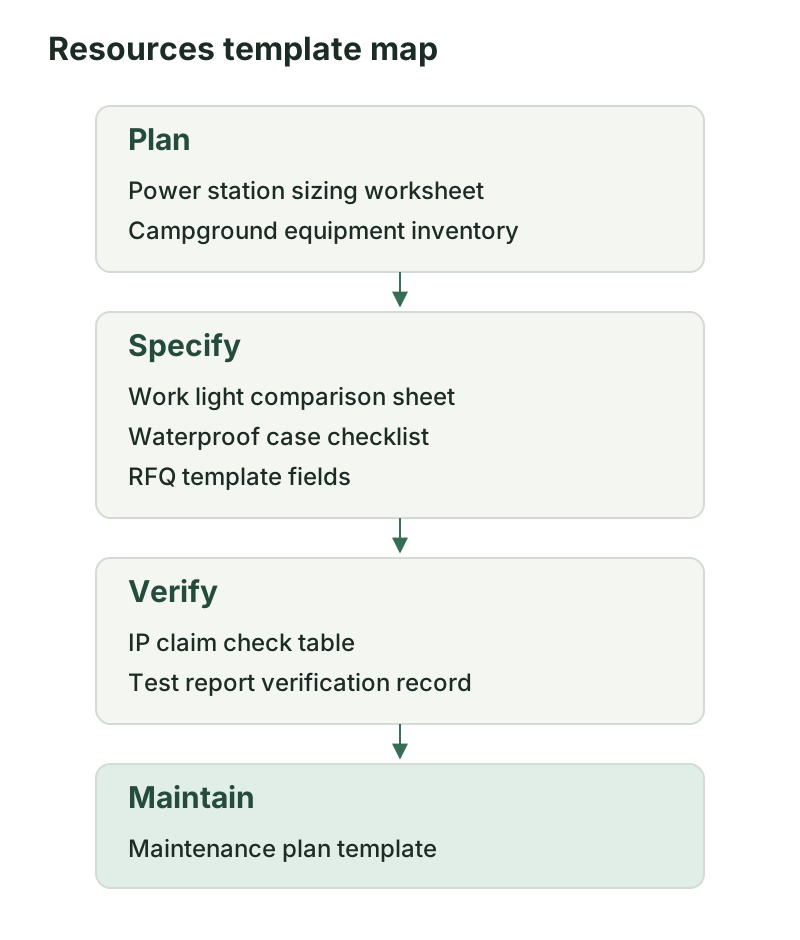
The eight templates cover different parts of buying and keeping equipment. One workable order is Plan, Specify, Verify, Maintain. You can start anywhere, and small purchases rarely need every stage.
Plan
- The Power station sizing worksheet lists loads and operating hours and records the assumptions behind a size estimate. Its method is in the power station sizing guide.
- The Campground equipment inventory lists what a site needs and tracks what is specified and bought. Its method is in the campground equipment checklist.
Specify
- The Work light comparison sheet puts candidate lights side by side on published specifications. See the work light buying guide.
- The Waterproof case procurement checklist records the requirements for a case and how each is checked. See the waterproof case guide.
- The RFQ template fields structure a request for quotation so that suppliers answer the same questions. See the RFQ guide.
Verify
- The IP claim check table records what a protection claim covers and what evidence supports it. See the IP rating guide.
- The Test report verification record notes what a supplier’s report covers and whether it matches the product offered. See the test report guide.
Maintain
- The Maintenance plan template sets up a schedule based on each model’s manual. See the maintenance plan guide.
The four stages feed each other. A sizing result becomes a requirement in the RFQ. A claim in a supplier’s quote goes into the IP check table, and the report behind it goes into the verification record. Once the equipment arrives, the model’s manual decides what the maintenance plan contains.
Using the CSV files
A CSV file is plain text with commas between values. Spreadsheet applications open it directly.
- Download the file from the card below, or from the guide that explains it.
- Open it in your spreadsheet software. If characters look wrong, use the import option and choose UTF-8 as the encoding.
- Look at the version row before you change anything. It states the template name and version, and you should keep it so that you know later which edition you used.
- Save a copy for each project, with the project name in the file name. Keep the downloaded original unchanged so that you can start again without downloading it a second time.
- If you save in CSV again, check that your software keeps the version row and column headings. For formulas, formatting or several sheets, save a spreadsheet file in your software’s own format and keep the CSV as the clean original.
Adapting a template
You are free to adapt a template to your site. Add fields for your own cost codes, locations, responsible people or approval dates, and delete rows that do not apply. Keep the evidence and source columns. They record where each value came from, such as a manual page, a quote or a report, and a table without them cannot show later why a decision was made. If a value is an assumption, leave it marked as one rather than writing it as a fact.
Version history
The version is part of each file name, for example -v1.0. When a template changes in a way that affects how it is used, the new file carries a new version number, and the guide notes the change. Files you have already saved are not altered.
| Template | Guide | Version |
|---|---|---|
| Power station sizing worksheet | Power station sizing | 1.0 |
| Work light comparison sheet | Work light buying | 1.0 |
| IP claim check table | IP ratings | 1.0 |
| Waterproof case procurement checklist | Waterproof cases | 1.0 |
| Campground equipment inventory | Campground checklist | 1.0 |
| RFQ template fields | RFQ guide | 1.0 |
| Test report verification record | Test report guide | 1.0 |
| Maintenance plan template | Maintenance plan | 1.0 |
Limits
A completed template is a record of your own planning and checking. It is not a compliance document, an approval or a certificate, and it does not show that equipment or a site meets any standard or regulation. Whether equipment is suitable and safe for a task depends on the manual, the site and the rules that apply there, and may need a qualified professional’s judgment. Examples inside the templates are illustrative, and the figures in them are not measurements or recommendations.
Reporting a problem
If a template has a problem, such as a wrong column, a broken download or an unclear field, tell us through the contact page. Please include the template name and version. The guides and their sources are listed on the four topic hubs, starting from the power and lighting hub, the cases and protection hub, the camp site equipment hub and the buying and maintenance hub.
Templates and checklists
Power station sizing worksheet
Helps you list loads and operating hours and record the assumptions behind a power station size estimate.
Work light comparison sheet
Helps you compare candidate work lights on published specifications side by side.
IP claim check table
Helps you record what an IP claim covers and what evidence supports it.
Waterproof case procurement checklist
Helps you specify and check requirements when buying a waterproof equipment case.
Campground equipment inventory
Helps you list the equipment a campground needs and track what is specified and bought.
RFQ template fields
Helps you structure the fields of a request for quotation for outdoor equipment.
Test report verification record
Helps you record what a supplier's test report covers and whether it matches the product.
Maintenance plan template
Helps you set up a maintenance schedule based on each model's manual.